Adventures in Ruby LSP Limbo
The Issue
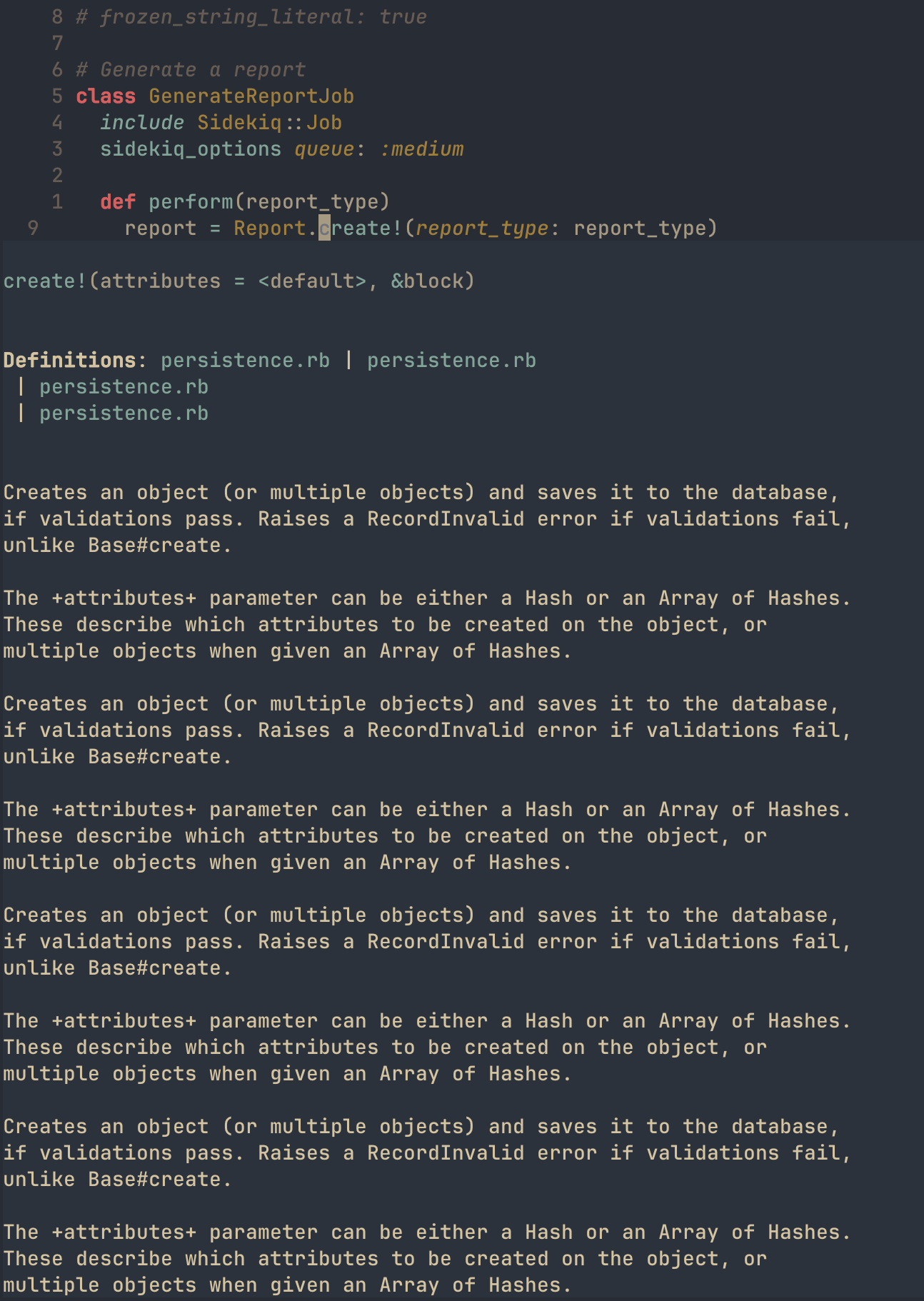
In my current Neovim configuration, I’m using ruby-lsp, Shopify’s Ruby/Rails language server. Before this language server came along, there was solargraph. While ruby-lsp seems to work great for things like go to definition and hover on Ruby and locally defined classes/methods, I really want to see hover documentation on my installed gems. For example, I want to press Shift+k on an ActiveRecord method. Here’s an example of what I’d like to achieve:
report = Report.create!(report_type: report_type)In this one line, I’m calling .create! on an ActiveRecord model. I’d really like to Shift+k on that specific method and get documentation about how .create! works, how it differs from .create. With ruby-lsp, it seems to be the case that every gem method returns a No information available message in the status bar.
When I was looking into solargraph, I came across this page that describes how it uses YARD to “gather information about your project and its gem dependencies”. I work on a team where we’re pretty strict about our YARD compliance, so this development excited me. My first instinct was to look into whether ruby-lsp supported this kind of parsing. I found this issue that stated the following:
Thank you for the feature suggestion.
However, we will not add support for YARD annotations. There are multiple reasons for that
1. We try to keep the Ruby LSP's concerns related only to Ruby itself. YARD is a separate gem and not every Ruby developer uses it

2. When it comes to adding type annotations, a complete gradual type system like Sorbet or Steep yields significantly better results. They provide the ability to narrow types, widen types, use generics, interfaces, etc - things that are not possible to do with YARD annotations

3. For handling declarations that occur via meta-programming, we are going to explore both options through our [addon system](https://github.com/Shopify/ruby-lsp/blob/main/ADDONS.md) and through RBS files. RBS is significantly more expressive and thus we will favor support for that for manually written annotations. And with the addon system we hope to provide APIs for other gems to teach the indexer how to handle their meta-programming DSLs
While slightly disappointed to find that the team was not adding support for YARD annotations, their reasoning is understandable. Not everyone uses YARD and the focus of ruby-lsp should be Ruby. Support for YARD parsing through the add-on system is an interesting idea, and one that I may pursue myself. From my limited research (searching ruby-lsp- on rubygems) I was not able to find any relevant addons for my area of interest.
The Solution (maybe?)
Due to this limitation, I think I’d like to try solargraph with the solargraph-rails extension. I found this Reddit comment to be insightful:
Ruby-LSP and Solargraph take fundamentally different approaches. While Ruby-LSP relies more on fuzzy searching for class and method definitions (based on my observation as a user), Solargraph takes a more “sophisticated” approach, closely mimicking how Ruby itself resolves definitions. It accounts for module inclusions, extensions, and other language features, making its results more precise. Additionally, it supports YARD annotations, which help infer return types and handle metaprogramming gaps.
For these reasons, Solargraph remains my LSP of choice—so much so that I even created the
solargraph-rspecplugin (apologies for the self-promotion!).With the release of version
0.51.0, Solargraph now supports Ruby 3.4:
🔗 ChangelogAs I mentioned here, thanks to
prism’s translation support for theparsergem interface, transitioning toprismmight not be as difficult as it sounds. I’m optimistic that this transition will happen in the near future. 🤞
Given this information, I think it’s only fair that I give solargraph a go and see what happens. For the purposes of this demonstration, I’m going to use bundler to see if I can get accurate information for the gems in my project, instead of all gems installed in the local version. It would be nice to avoid including solargraph in my Gemfile (since my team members don’t use it), but I’m just experimenting. There are a couple things I have to do to switch over:
- Uninstall
ruby-lspandruby-lsp-railsin my local Rails app environment withgem uninstall ruby-lsp ruby-lsp-rails - Remove
.ruby-lspdirectory (don’t think this is necessary, but I’m going to do it anyways) - Update my
nvim-lspconfigto usesolargraphinstead ofruby-lspforrubyfiletypes- This includes configuring the
cmdparameter to runbundlelike this: `
- This includes configuring the
lspconfig.solargraph.setup({
    -- capabilities are coming from my blink.cmp config
    capabilities = capabilities,
    cmd = { "bundle", "exec", "solargraph", "stdio" },
})- Add
solargraphandsolargraph-railsto my Gemfile andbundle install - Configure
solargraphwith.solargraph.yml - I’m using the config from the aforementioned Reddit user as inspiration. A default config can be generated in the Rails app directory with
solargraph config. - Cache gem documentation with
bundle exec solargraph gems
I’d prefer not to include solargraph in my Gemfile, but it may be the case that I need to run bundle exec solargraph gems to cache gem documentation for my specific project instead of all gems in the local Ruby version.
After solargraph has been installed and configured, I test that it has attached to my buffer by running :LspInfo:
vim.lsp: Active Clients ~
- solargraph (id: 1)
  - Version: ? (no serverInfo.version response)
  - Root directory: ~/code/w/apotheca/rails_app
  - Command: { "~/.local/share/mise/installs/ruby/3.4.1/bin/bundle", "exec", "solargraph", "stdio" }
  - Settings: {
      solargraph = {
        diagnostics = true
      }
    }
  - Attached buffers: 2, 11
Yay! solargraph is up and running. Let’s see if I get documentation on my aforementioned .create! method.
Dang… “No information available” :(
I’m able to get comprehensive LSP logs by enabling vim.lsp.set_log_level("debug") in my init.lua Neovim config. Here’s the output after pressing Shift+k:
[DEBUG][2025-03-31 15:54:24] ...m/lsp/client.lua:677	"LSP[solargraph]"	"client.request"	1	"textDocument/hover"	{ position = { character = 20, line = 8 }, textDocument = { uri = "rails_app/app/jobs/generate_report_job.rb" } }	<function 1>	11
[DEBUG][2025-03-31 15:54:24] .../vim/lsp/rpc.lua:277	"rpc.send"	{ id = 5, jsonrpc = "2.0", method = "textDocument/hover", params = { position = { character = 20, line = 8 }, textDocument = { uri = "rails_app/app/jobs/generate_report_job.rb" } } }
[DEBUG][2025-03-31 15:54:24] .../vim/lsp/rpc.lua:391	"rpc.receive"	{ id = 5, jsonrpc = "2.0" }
We can see here that there’s no content in the response from the LSP. Let’s see what happens if we try another method. I went to my model and hovered over the following line:
"ReportService::#{report_type.to_s.camelize}".safe_constantize.newwhich outputted the following in my LSP log:
[DEBUG][2025-03-31 16:15:33] ...m/lsp/client.lua:677	"LSP[solargraph]"	"client.request"	1	"textDocument/hover"	{ position = { character = 50, line = 52 }, textDocument = { uri = "rails_app/app/models/report.rb" } }	<function 1>	2
[DEBUG][2025-03-31 16:15:33] .../vim/lsp/rpc.lua:277	"rpc.send"	{ id = 54, jsonrpc = "2.0", method = "textDocument/hover", params = { position = { character = 50, line = 52 }, textDocument = { uri = "rails_app/app/models/report.rb" } } }
[DEBUG][2025-03-31 16:15:33] .../vim/lsp/rpc.lua:391	"rpc.receive"	{ id = 54, jsonrpc = "2.0", result = { contents = { kind = "markdown", value = "String#safe_constantize\n\n+safe\\_constantize+ tries to find a declared constant with the name specified  \nin the string. It returns +nil+ when the name is not in CamelCase  \nor is not initialized.\n\n\n```ruby\n'Module'.safe_constantize  # => Module\n'Class'.safe_constantize   # => Class\n'blargle'.safe_constantize # => nil\n```\n\nSee ActiveSupport::Inflector.safe\\_constantize.\n\nVisibility: public" } } }
From the logs, we can see that triggering a textDocument/hover event on .safe_constantize returns the documentation in the result key.
Let’s dig into both of these examples and see if we can figure out why one is working and the other isn’t. First, let’s start with my Report.create!(...) call. .create! In Rails v7.1.5.1, .create! is a method inside ActiveRecord::Persistence::ClassMethods. Here’s the source code from the Rails v7.1.5.1 tag on GitHub:
# Creates an object (or multiple objects) and saves it to the database,
# if validations pass. Raises a RecordInvalid error if validations fail,
# unlike Base#create.
#
# The +attributes+ parameter can be either a Hash or an Array of Hashes.
# These describe which attributes to be created on the object, or
# multiple objects when given an Array of Hashes.
def create!(attributes = nil, &block)
  if attributes.is_a?(Array)
    attributes.collect { |attr| create!(attr, &block) }
  else
    object = new(attributes, &block)
    object.save!
    object
  end
end
We can see here that the documentation is clearly defined. Given solargraph’s ability to parse YARD docs into LSP documentation, this should show up IF solargraph is able to figure out that the .create! that I’m calling is, in fact, the one defined in ActiveRecord::Persistence::ClassMethods. If I run bundle exec yard server --gems in the root of my project directory, I get interactive YARD docs for my installed gems at localhost::8808. If I navigate to ActiveRecord::Persistence::ClassMethods, I see docs for the .create! method! Something is not right…
Digging around in the solargraph repo, I found this gist. A comment at the top reveals what might be going wrong:
# The following comments fill some of the gaps in Solargraph's understanding of
# Rails apps. Since they're all in YARD, they get mapped in Solargraph but
# ignored at runtime.
Adding the gist to the root of the directory “fills some of the gaps” in how solargraph works with Rails apps. If we can trick solargraph into parsing this file as valid Ruby code, we should be able to get intellisense and hover definitions, even if we don’t explicitly include/extend these modules/classes in other places.
After adding the contents of the gist to a file called solargraph_extensions.rb to the root of my directory and restarting solargraph, I was praying that Shift+k on my Report.create!(...) would give me hover docs. And…
“No information available.”
I’m starting to run out of steam on this. As a last ditch effort, I tried running solargraph scan -v. This command does the following, according to the command line documentation:
A scan loads the entire workspace to make sure that the ASTs and maps do not raise errors during analysis. It does not perform any type checking or validation; it only confirms that the analysis itself is error-free.
After a mostly successful scan, I noticed an error when parsing Thor, the tool used to build CLIs in Rails apps. The scan outputted the following error:
[Solargraph::ComplexTypeError]: Invalid close in type DidYouMean::SpellChecker)
You can view the whole stack trace in the error I reported in the solargraph repo. For now, I’m going to tell myself that my additional documentation isn’t loading because I’m erroring out during the solargraph indexing process. Whether or not this is true, I’m not sure. I am definitely sure that I’m done for the night…
The Next Day
Something extraordinary has occurred. I have figured something out. This problem may have been unique to my development setup for the project I’m working on. At my place of work, we have a standardized setup for our development environments. It looks like this:
- Boot up a Vagrant machine
- Spin up all the application services using a Docker Swarm
- Boot up the Rails app after everything is set up
- Sync the local
rails_appfolder with therails_appfolder in the Vagrant box
This allows for a development environment that can be developed locally in an editor, but we have to run our Rails commands, like bundle exec rspec inside the Docker container INSIDE the Vagrant box. This isn’t too bad, it just takes a couple extra steps.
LSP (Language Server Protocol) integration was the tricky part of this setup. After some experimentation with connecting to the LSP running inside the Vagrant box, I decided I would just run the same version of ruby-lsp locally, as it was close enough.
The whole reason I decided I wanted to switch over to solargraph was because I believed that ruby-lsp didn’t support any Rails documentation, just raw Ruby stuff. This was a misinformed assumption, as I didn’t really understand how ruby-lsp-rails worked.
Upon a little more reading, I read something that piqued my interest:
Runtime Introspection
LSP tooling is typically based on static analysis, but
ruby-lsp-railsactually communicates with your Rails app for some features.When Ruby LSP Rails starts, it spawns a
rails runnerinstance which runsserver.rb. The add-on communicates with this process over a pipe (i.e.stdinandstdout) to fetch runtime information about the application.When extension is stopped (e.g. by quitting the editor), the server instance is shut down.
When I read this, the thought occurred to me: “What if rails runner isn’t working because of my complicated development environment?”
I tried this command:
bin/rails rails runner ~/.local/share/mise/installs/ruby/3.4.1/lib/ruby/gems/3.4.0/gems/ruby-lsp-rails-0.4.0/lib/ruby_lsp/ruby_lsp_rails/server.rb start
and I got the following output:
.local/share/mise/installs/ruby/3.4.1/lib/ruby/gems/3.4.0/gems/activesupport-7.1.5.1/lib/active_support/message_encryptor.rb:307:in 'OpenSSL::Cipher#key=': key must be 16 bytes (ArgumentError)
What if something about my local credentials file wasn’t being synced correctly and this was preventing ruby-lsp-rails from spinning up the Runtime Introspection? What if that was preventing my LSP client from receiving better documentation for Rails classes/methods?
After sshing into my virtual machine, copying the encrypted key, removing my current development.key(which was empty) and replacing it with the contents of the remote file, I watched the LSP logs for signs of life.
[INFO][2025-04-01 13:37:23] ...lsp/handlers.lua:566 "Finished booting Ruby LSP Rails server"
Ok… This looks good. I haven’t seen this in the logs before. Let’s try Shift+k on my .create! method.